if you want to download firmware for ipod or iphone click here to download.
http://www.iphonedownloadblog.com/iphone-downloads/
Saturday, November 27, 2010
jailbreak 4.2.1 with redsn0w
Tutorial: How to Jailbreak Your iPhone iOS 4.2.1 with RedSn0w
by Sebastien on November 23rd, 2010
 106 Comments
RedSn0w was recently updated to jailbreak iOS 4.2.1. While this is excellent news, it doesn’t come without its drawbacks as only the iPhone 3G, older iPhone 3GS, and non-MC iPod touch 2G get the untethered jailbreak.
Other devices get a tethered jailbreak, which means that every time you reboot your iPhone, you will have to plug your iPhone in your computer, and launch RedSn0w to start your iPhone. Hopefully the Dev Team will come up with a way to bypass this soon.
If you are an unlocker, you should not update to 4.2.1 yet. You will lose your chances of unlocking. Wait for PwnageTool, which should be updated relatively soon.
This step by step guide will show you how to jailbreak your iPhone iOS 4.2.1 with RedSn0w. This tutorial was made using an iPhone 3GS but the steps are the same, no matter what device you are using…
Step 1: Make sure iTunes is updated to its latest version. Make sure your iPhone is on 4.2.1. If not, update it via iTunes.
Step 2: Download RedSn0w 0.9.6b4 and the firmware for your device from our downloads section.
Step 3: Launch RedSn0w and browse for the firmware you downloaded in step 2.

Step 4: Select to Install Cydia.
Step 5: Make sure your iPhone is turned off and plugged in your computer. If it’s not, plug it in, then turn it off. Click next, and be ready to get your iPhone in DFU mode.

Step 6: Hold the Home and Power button together for 10 seconds. Release the Power button while still holding the Home button for a few seconds.
Step 7: Your iPhone will run lines of codes. When it’s done. Click Finish. You’re done!

Now if you have a newer device such as the iPhone 4, every time you reboot your iPhone, you will have to launch RedSn0w and choose the “Just boot tethered right now” option to boot your iPhone.

There is currently no unlock for iOS 4.2.1 but we will keep you updated as soon as it is released.

Wednesday, November 24, 2010
Cydia Is Now Saving iOS 4.2 SHSH Blobs for the Next Untethered Jailbreak
The iPhone developer and hacker behind Sn0wbreeze has confirmed that Cydia has started saving SHSH Blobs of iOS 4.2 betas for the next untethered jailbreak on the final version of iOS 4.2.
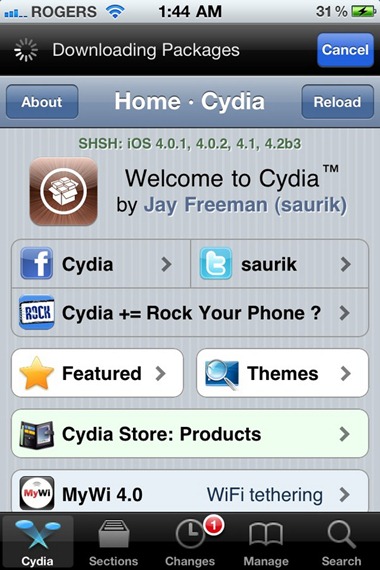
Now as to why this is important? Geohot’s Limera1n uses a userland exploit from Comex to make an untethered jailbreak for all iOS 4.1 devices. While Apple cant patch the original hardware based Limera1n exploit, the userland exploit though has been patched in the final version of iOS 4.2firmware.
The next update to Limera1n based iOS 4.2 jailbreak tool will require SHSH blobs for iOS 4.1 for anuntethered jailbreak on iOS 4.2. So if you don’t save your SHSH blobs now, you will get tethered jailbreak on iOS 4.2, NOT untethered.
Since Apple hasn’t released iOS 4.2 to public yet, now is the time to save your SHSH blobs to make sure you get an untethered jailbreak once iOS 4.2 is out. Once the public version of iOS 4.2 is released, Apple will stop signing the old firmware, making it impossible for you to save blobs for iOS 4.1. You can follow our step by step guide posted here to save SHSH blobs on iOS 4.1 before it is too late.
IOS 4.2 jailbreak and unlock
iOS 4.2, at least from what information we have so far, is slated for release this Friday and it’s going to be a significant update for iPad (not so much for iPhone / iPod touch, though). And of course, there’s going to be a jailbreak to accompany the new iOS version. Here’s all you need to know.
NEWS FEATURES / UPDATES FOR IPAD IN IOS 4.2
- Multitasking
- Folders
- AirPrint (print mail/photos/web pages directly to printer on WiFi network) and AirPlay (stream media to Apple TV / AirPlay speakers)
- Game Center
- Unified inbox, threading and ability to open attachments with third party apps for Mail app
- New search and find ability in Safari
- UI Tweaks: volume control and brightness control straight from task switcher
NEW FEATURES / UPDATES FOR IPHONE & IPOD TOUCH IN IOS 4.2
- YouTube (ability to thumbs up / down videos)
- FaceTime link in Messages app
- Ability to restrict installing and deletion of apps as well features of other apps.
- UI tweaks: volume control from task switcher
- iPhone 3G performance improvements
JAILBREAK AND UNLOCK FOR IOS 4.2
Here a few things you should know about iOS 4.2’s upcoming jailbreak and unlock before you make any move:
- You need to save iOS 4.1 SHSH blobs to Cydia if you want untethered iOS 4.2 jailbreak.
- The untethered-ness of iOS 4.2 jailbreak will be of the userland nature i.e. it works on non-vital code and can be easily patched by Apple.
- If you rely on carrier unlock, stay in a galaxy far, far away from this (sorry, but I just had to make that Star Wars reference) until updated PwnageTool / Sn0wbreeze comes out.
- The jailbreak will support all iOS devices and all firmwares capable of being jailbroken.
By all accounts, we’re within a few days of Apple’s official public release of Firmware 4.2. Here’s what you need to know:
What does this mean to you?
- Thanks to geohot’s limera1n exploit, and our original pwnage2 exploit, and @pod2g’s ipod2g-MC exploit, absolutely all devices at all iOS firmware versions are capable of being jailbroken.
- The untethered jailbreak of those very latest FWs and latest devices depends on @comex hacks. His hacks so far extend only to 4.1 and 4.2beta3. He’s working on a way to extend it to 4.2 and beyond. Just wait for him to work out his method.
- iPhone 3G and 3GS unlockers will be covered by our upcoming unlock. Stay away from any updates to Apple FW until our official release and you’ll be okay. Just stay away from all Apple IPSWs
- iPhone4 unlockers are not left out in the cold. @sherif_hashim has found some very promising avenues to pursue. Those will be explored as soon as possible after all the 4.2 madness.
- If you’re an unlocker, just stay where you are. Please, just stay where you are. Any mistakes you make now may be permanent.
- If you only care about the jailbreak and you’re absolutely sure you have your personalized 4.1 SHSH hashes, feel free to experiment but keep in mind that any mistakes you make may result in your losing pictures or notes or bookmarks that you’d rather keep. Honestly unless you love living on the bleeding edge, it’s better to just wait for official updates from Cydia/redsn0w/PwnageTool.
- Don’t buy or donate to any unlock or jailbreak scammers. Every legitimate solution you will find for unlocks or jailbreaks will be offered without an extended hand. That’s how the iPhone jailbreak/unlock community has succeeded. It’s about freedom to do what you want with your $300 device — not about donations, egos, tweets, or “interviews.”

We’ve posted a guide on how to save iOS 4.1 SHSH blobs already, refer to that if you haven’t saved your blob yet. There is a chance that iOS 4.2 jailbreak may be delayed, as hacker comex tweeted.
I personally won’t be upgrading to iOS 4.2 since, well, it really is for iPad users. iPhone / iPod touch users don’t get much besides an updated native YouTube app. Wake me up when iOS 5 comes out.
You can follow us on Twitter or join our Facebook fanpage to keep yourself updated on all the latest from iPhone jailbreak and unlock releases.
jailbreak iphone 4.2
Apple has seeded the final GM release of iOS 4.2 to developers. The recently released Redsn0w 0.9.6b2 (based on Geohot’s Limera1n) can jailbreak all of the current iOS devices on iOS 4.2. This has also been confirmed by MuscleNerd of the iPhone Dev Team.
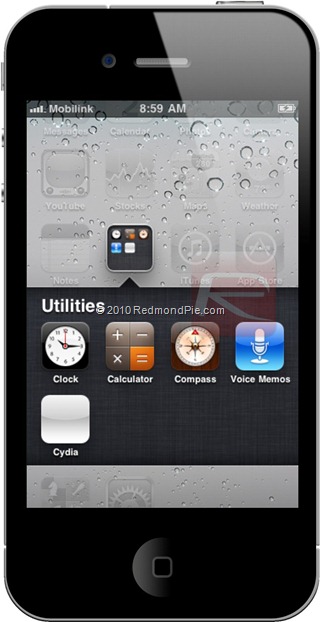
Today Apple released to developers the GM seed for 4.2. Tinkerers will find that yesterday’s redsn0w jailbreaks today’s 4.2 GM seed, simply by pointing redsn0w at the 4.1 IPSW (rather than the 4.2 one). Right now it mostly only makes sense for JB app developers to do that because many apps (including Cydia itself) need to be updated for 4.2. However, if all you want to do is enable afc2 (to use iFunBox or other file browsers), or to tweak settings like Battery % and Homescreen wallpapers, then go for it (if you have valid paid access to the GM seed). Be sure to uncheck the Cydia box, though! Ultrasn0w unlockers should stay very far away from this!!
So if you are feeling adventurous, you can give Redsn0w 0.9.6b2 a go on iOS 4.2 GM release. Supported devices are:
- iPhone 4
- iPhone 3GS
- iPhone 3G
- iPad
- iPod touch 4G / 3G / 2G
NOTE: All iPhone unlockers MUST STAY AWAY from iOS 4.2 until new version of Ultrasn0w unlock is available.
Step 1: Download iOS 4.2 & iOS 4.1 (required for Redsn0w 0.9.6b2) for your version of iOS device.
Step 3: Start Redsn0w 0.9.6b2 and point it to iOS 4.1 (Final Version, NOT iOS 4.2) to proceed with the jailbreak.
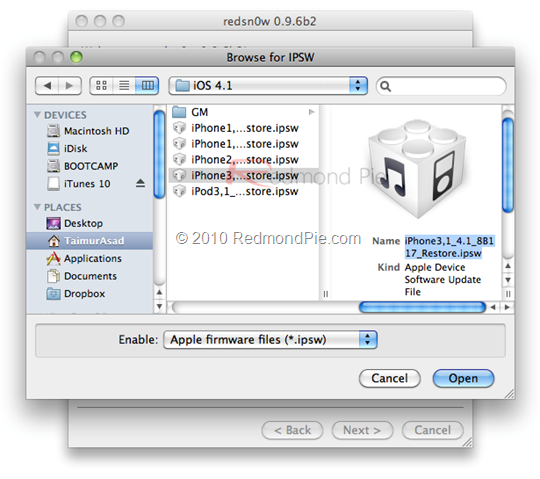
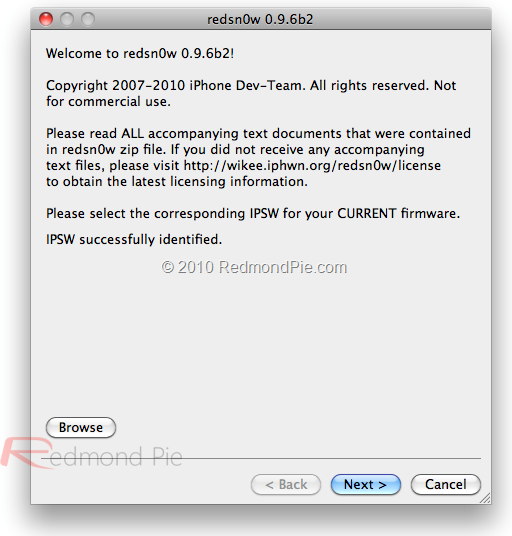
Step 4: Now select “Install Cydia” and click “Next”. Optionally (if available), you can also select any other option you like.
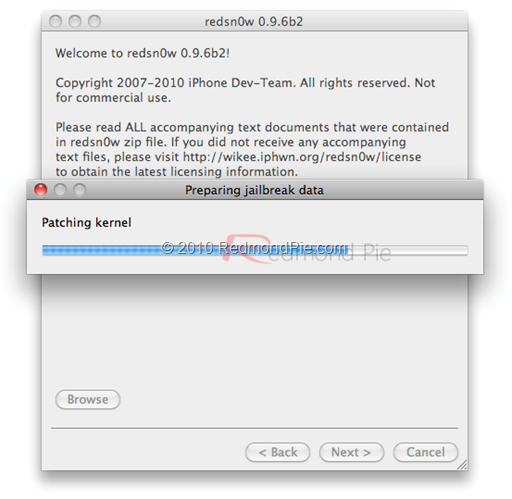
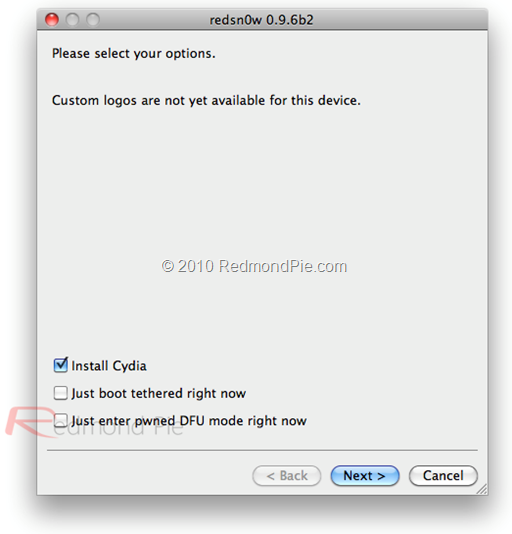
Step 5: Now make sure your device is both OFF and PLUGGED IN to the computer before you click “Next”.

At this stage you will be presented with a screen where you will have to quickly hold “Power” button and then while holding the “Power” button, you will now have to hold “Home” button too. Now after few seconds release “Power” button but keep holding “Home” button until installation begins.
Step 6: Sit back and enjoy while redsn0w will do all the rest for you. Once done, your iPhone, iPad and iPod touch will restart automatically and you will find it jailbroken on the latest iOS 4.2firmware.
UPDATE 1: Ok here is a little update. I have just tried to jailbreak iPad on 4.2 by pointing Redsn0w to iOS 3.2.2 and it didn’t work. So except for the iPad, Redsn0w jailbreak on iOS 4.2 is working fine on all iPhones and iPod touches .
Download iOS 4.1 (Final version) for iPhone 4, 3GS, 3G, iPod touch
Download iOS 4.2 for iPhone 4, 3GS, 3G, iPad, iPod touch
Download iOS 3.2.2 for iPad
Download Redsn0w 0.9.6b2 for Windows and Mac
Download iOS 4.2 for iPhone 4, 3GS, 3G, iPad, iPod touch
Download iOS 3.2.2 for iPad
Download Redsn0w 0.9.6b2 for Windows and Mac
P.S. Apologies for all the harsh watermarking, but it had to be done to combat all the pirates (bad sites) out there.
Caching Apple's Signature Server
for windown
To this end, I have constructed a server that duplicates the functionality exposed by Apple's signature server, except using "on file" results rather than live requests.
All we need, then, is to make iTunes use it. Luckily, most operating systems also have the ability to locally define bypasses on specific hostnames through a file called host. Using this, we can redirect requests to Apple's signature server to Cydia.
So, open the file C:\Windows\System32\drivers\etc\hosts (Windows) or/etc/hosts (Mac OS X) and add the following entry to the bottom of the file.
74.208.10.249 gs.apple.com
74.208.10.249 gs.apple.com
Now, when iTunes thinks it is talking to Apple, it is talking to Cydia instead. Doing this will allow iTunes to access signatures already stored by Cydia's "on file" feature.
This server will also act as a cache for any SHSH blobs it hasn't seen, acting as an intermediary to Apple's server. This effectively registers your device with the "on file" mechanism, which means you can now enjoy the protections of being able to downgrade your firmware in the future even if you aren't jailbroken.
This point should be stressed: even if you don't jailbreak, and even if you never intend to jailbreak, you should consider using the new "on file" service.
Let's say that Apple releases an OS upgrade in the future, you take it, and they break something important. Maybe they break your e-mail account, or your todo list. Your business is now crippled.
If only you could downgrade, right? Alas, Apple won't let you anymore. That's where the new signature cache server comes in: by doing your restores through this server you secure your ability to not accept upgrades from Apple if the need is dire.
Tuesday, November 23, 2010
jailbreak 4.1 with limera1n
Limera1n jailbreak is out now. To jailbreak iPhone 4, iPhone 3GS iOS 4.1 with Limera1n jailbreak follow the steps below. Using Limera1n you can jailbreak iOS 4.1 on iPhone 4, iPhone 3GS, iPod Touch 3G,iPod Touch 4G. Limera1n is currently available for Windows OS only.

IMPORTANT
- Limera1n requires you to be running iOS 4.1 firmware on your iPhone/iPod Touch in order to jailbreak it. If you’re an iPhone user and depends on unlock, do NOT use Limera1n/update firmware to iOS 4.1 because UltraSn0w doesn’t support latest baseband. Wait for the PwnageTool.
However, iPhone 4 users can still update to iOS 4.1 without updating baseband using Tinyumbrella. Here is how to: update iPhone 4 to iOS 4.1 without updating baseband - iPhone 3GS new bootrom users should not use Limera1n because there’s still a bug that need to be addressed for this device. Works fine now.
How to Jailbreak iPhone 4, 3GS iOS 4.1 with Limera1n
Step 1
Step 2
Execute the downloaded Limera1n.exe and hit the make it ra1n button
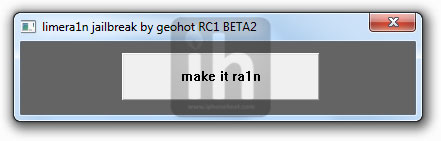
Step 3
Now connect your iPhone 4 / iPhone 3GS

Your device will go into Recovery Mode
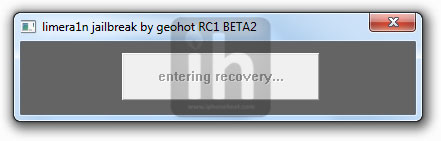
Step 4
Hold down the Home + Power buttons.
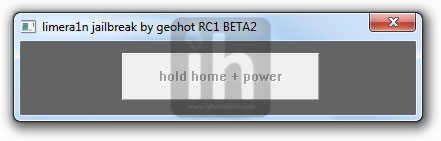
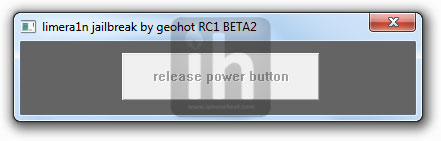
Release the Power button and keep holding the Home button.
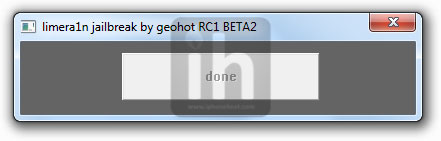
The follow message will appear when Limera1n is done with the jailbreak process
Step 5
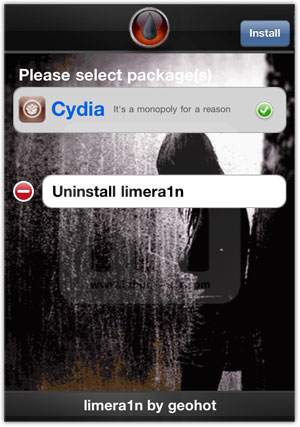
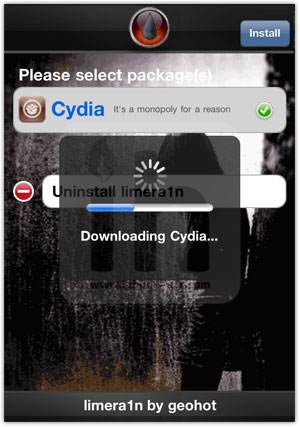
Open the Limera1n app from your iPhone home screen and install Cydia from there. Once Cydia is installed, Reboot your iPhone and you’re Done!
Have Fun!
jailbreak 4.1 with pwnage tool 4.1.2
PwnageTool fans can no
w employ the iPhone Dev Team’s most popular jailbreak application for Mac OS X to hack their iOS 4.1 iPhone or iPod touch, as well as their iPad and second-generation Apple TV.
Note: PwnageTool is a Mac-only jailbreak solution. Windows or Linux versions of the application are currently unavailable.
Step 1 - Download the latest version of iTunes and install it
iTunes Download
Step 2 - Launch iTunes, connect your device to your Mac, and sync all your content so you don’t lose anything you had originally stored. Alsovery important, do a backup so you can restore all your personal stuff after jailbreaking.
Step 3 - Download PwnageTool 4.1.2 from the iPhone Dev Team’s Blog.
Step 4 - Download your appropriate iOS 4.1 firmware bundle (IPSW file).
IPSW Download
Step 5 - Launch PwnageTool and select your device, then hit the blue arrow to proceed to the next step.

Step 6 - Allow PwnageTool to find your iOS 4.1 IPSW file. Once displayed, select it, and hit the blue arrow.

Step 7 - If everything goes well up to this point, PwnageTool will ask whether you’re sure you want to proceed with creating a custom IPSW file to which you’ll need to restore to jailbreak. By choosing "Yes", you will continue with the process of jailbreaking your device. By choosing "No", you will be reverted to the device-select screen.

Step 8 - If you chose Yes, and if you’re trying to jailbreak an iPhone, PwnageTool will then ask if you have an iPhone contract that would activate normally through iTunes. If you are unsure, click No.

Step 9 - PwnageTool will proceed to create your custom (jailbroken) IPSW file which will be placed on your computer’sdesktop when the process is over. Be patient, depending on your system specs, it may take between 2 to 5 minutes to create the file.

Step 10 - Connect your device to your computer, and follow the instructions appearing in the PwnageTool window to put your device into DFU (restore) mode.


Step 11 - Close PwnageTool, and launch iTunes.
Step 12 - Allow iTunes to recognize your device. If you don’t have automatic updates enabled, iTunes will need to check the iPhone software update server to identify the device. Click “Check”

Step 13 - iTunes will then recognize your device as “in recovery mode” at which point you must click “ok”, wait for iTunes to list your device in the left pane, and select it.

Step 14 - With your device selected, hold the Alt (Option) key and hit the “Restore” button in the iTunes interface. Select your custom IPSW file, and hit “Choose”
Step 15 - A message will appear saying “iTunes will erase and restore your iPhone to iOS 4.1 and will verify the restore with Apple.” Click “Restore” to proceed.

Step 16 - This is the final step, where you must simply wait for the device to be restored to the custom firmware bundle. Your device screen will show the Apple logo and a progress bar indicating installation progress. When it reboots, the iPhone / iPod touch will be jailbroken, and you will have Cydia installed by default.

Softpedia doesn't encourage jailbreaking / unlocking the iPhone / iPod touch / iPad / Apple TV, or any other device.
This article has a purely informational purpose and doesn't, in any way, suggest that you should hack your Apple device.
Using hacks may render your device unusable, or may reduce the quality of your experience employing the respective device.
If you choose to download and install jailbreak tools, you will do so at your own risk. Unlocking / jailbreaking your iPhone / iPod touch / iPad / Apple TV may violate your warranty or the EULA with Apple and / or your cellular-service provider.
Subscribe to:
Posts (Atom)